Product
Liveresults
Real-time results from MeOS – on phones, in the arena and on big screens
live.metsa.app is a free service that shows orienteering results in real time. MeOS at the finish pushes results up to live.metsa.app, and from there everyone can follow along – on their phone, on a computer or on TV screens in the clubhouse or arena. Places and time gaps are calculated automatically and updated every second.
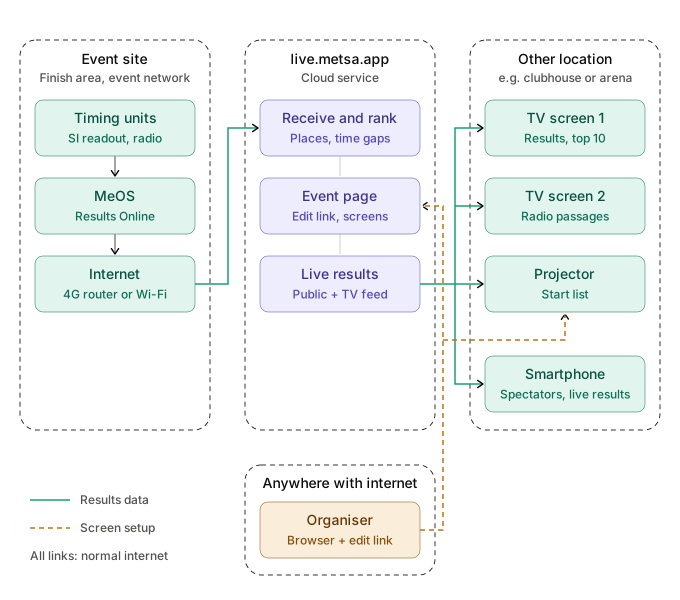
How it works
Create the competition
The organiser creates the competition at live.metsa.app/organiser/new with name, date, venue and map link. There is no login – a confirmation code is sent by email, and the competition page is reached through a secret edit link.
Connect MeOS
The competition page gives you an upload URL, a competition ID and a password. Enter the three in MeOS’ Results Online, and results are uploaded continuously as runners are read out or pass a radio control.
Share the results
The competition gets a public link and a QR-code poster (PDF in English and Danish) to put up at the event. Spectators and runners scan the code and follow along on their own phone – nothing to install.
Features
TV screens
Open live.metsa.app/tv on a screen and enter the competition’s TV code. From then on the screen is controlled from the competition page: choose classes, start list or latest passings, light or dark theme and text size. Screens can be anywhere with an internet connection – including a Raspberry Pi behind a TV in the clubhouse.
Pricing
live.metsa.app is free to use.
Get started
Read the full guide in the documentation – from creating the competition through MeOS setup to TV screens and troubleshooting.